P
K

Strata Logging Service to Microsoft Sentinel: the DCR migration
Palo Alto's legacy Data Collector path loses support on 14 September 2026. This is the DCR-based Log Ingestion API migration end to end — including the silent schema failure the vendor documentation barely mentions.
·
8 min read
·
Palo Alto Networks
Microsoft Sentinel
Log Forwarding
Detection Engineering
Applies to
Source: Strata Logging Service (logs originating from Palo Alto Networks NGFWs and Prisma Access)
Destination: Microsoft Sentinel via the Azure Monitor Log Ingestion API (DCR-based)
Console: Strata Cloud Manager — Sentinel forwarding no longer appears in the classic Strata Logging Service console
Replaces: the legacy Azure Monitor HTTP Data Collector API
Licensing: an NGFW or Prisma Access source, plus Strata Cloud Manager Pro or Strata Logging Service
Key takeaways
The legacy Data Collector API reaches end of support on 14 September 2026. The DCR-based Log Ingestion API is the supported path — but this is end of support, not a hard shutdown, so migrate deliberately rather than in a panic.
Sentinel forwarding now lives only in Strata Cloud Manager, not the Strata Logging Service console.
The DCR defines the table schema, and that schema is enforced. A field whose name or type doesn't match — or that the DCR never declares — is dropped on ingestion.
An HTTP 204 confirms receipt, not ingestion. Empty columns are almost always a schema or type mismatch, not a transport failure.
Authentication is an Entra service principal with the Monitoring Metrics Publisher role on the DCR. No interactive redirect URI.
Migrating a legacy table? Strip the type suffixes from every column (
Action_s→Action) before reusing the schema.
What this migration actually is
For years, forwarding Strata Logging Service logs into a Log Analytics workspace meant the Azure Monitor HTTP Data Collector API: a workspace ID, a shared key, and a POST. It worked, but it was a 2016-era design — symmetric-key authentication, no server-side shaping, and Azure inventing column types from whatever you happened to send.
The Log Ingestion API replaces it. Authentication moves to an Entra service principal over OAuth. A Data Collection Rule (DCR) sits in front of the workspace, declares the table schema explicitly, and can apply a KQL transformation at ingestion time. You gain role-based access control, private-link support, and the ability to shape data before it lands. You also inherit one consequence that runs through the rest of this piece: the schema is now enforced, and anything that doesn't fit is discarded quietly.
This walkthrough covers both a clean build and a migration from the legacy sink. I ran it end to end against a production Strata Logging Service tenant; the screenshots are from that work.
Why now — read the deadline carefully
Two Microsoft dates matter. On 1 March 2026 the Data Collector API endpoint stopped accepting TLS versions below 1.2, so any client that can't negotiate TLS 1.2 already can't ingest. On 14 September 2026 the legacy API reaches end of support.
That second date is widely misread. Microsoft's current guidance is explicit that existing ingestion keeps working for TLS 1.2+ clients after that date; what ends is support — no new features, no further investment, only critical security fixes. The older Azure Updates retirement announcement said the endpoints would become unavailable after the cut-over, and that wording — now outdated — is the source of most of the confusion.
The practical reading: nothing breaks overnight, but you should not be standing up new production ingestion on a deprecated API, and you should migrate what you already run — not least because the Data Collector API never supported Azure Monitor Private Link. That is the whole reason this walkthrough exists.
The moving parts
Everything on the Azure side has to exist before Strata Cloud Manager has anything to authenticate to. In order: a Data Collection Endpoint, a Data Collection Rule with a defined table, an Entra service principal with a secret, and a role assignment. Only then does the forwarding profile have somewhere to send.
One note on where the setting lives. As Palo Alto migrates features into Strata Cloud Manager, Sentinel forwarding now appears only in SCM, not in the classic Strata Logging Service console. As of June 2026 the option had to be enabled per tenant by raising a support case; by the time you read this it is likely generally available.
The procedure
1. Create the Data Collection Endpoint
The DCE is the ingestion front door. In the Azure portal, search for Data collection endpoints, create one in the same region as your Log Analytics workspace, and note the Logs Ingestion URL from the overview — you'll need it when you assemble the SLS.
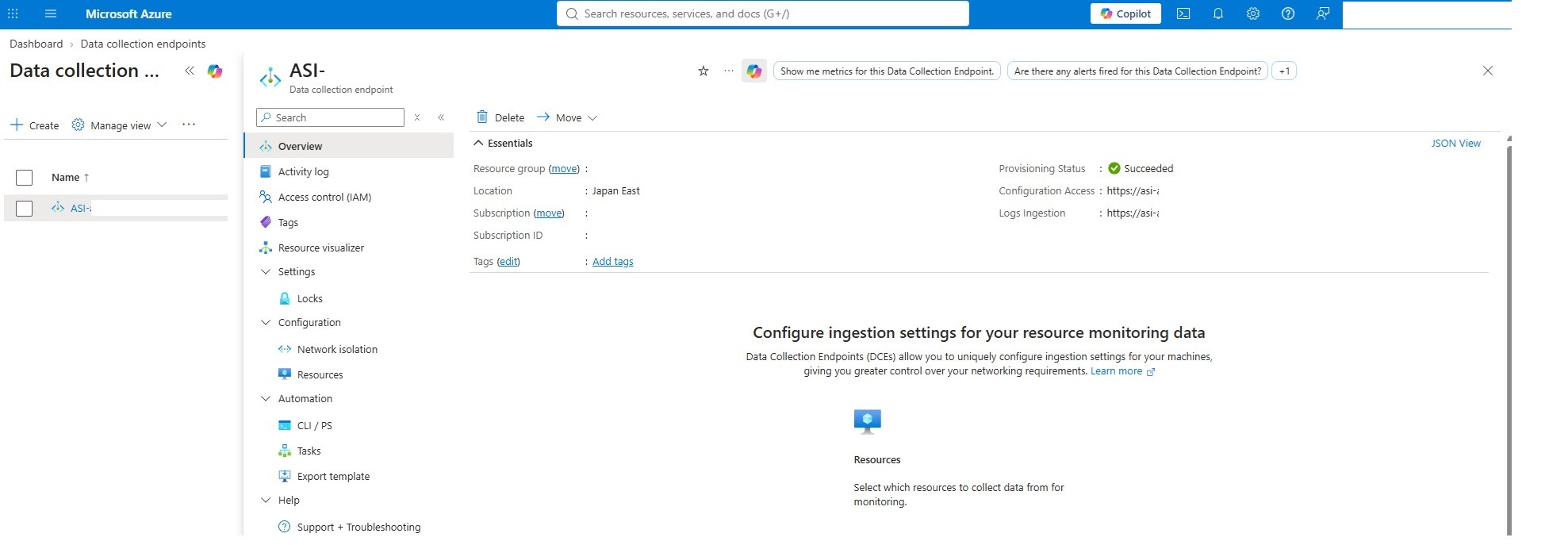
2. Create the Data Collection Rule and define the schema
This is where the integration quietly succeeds or fails. Create a DCR of platform type Custom, associate the DCE and the workspace, and define a table whose columns match — exactly — the fields Strata Logging Service sends. The field definitions for each log type are in Palo Alto's network log reference.

Open the DCR's JSON View to read the two values the forwarding profile needs.
From the JSON view you need two things: the immutableId under properties, and the stream name under dataFlows. Both go into the SLS URL later.

The immutable ID sits under properties.

The stream name sits under dataFlows → streams.
If you're migrating an existing Classic table, you can reuse its schema — but strip the legacy type suffixes from every column first. The Data Collector API appended a type marker to each name (_s string, _d double, _b boolean); the DCR schema uses the bare name. Action_s becomes Action, and so on.
Two constraints bite here:
No hyphens in column names. Azure Log Analytics forbids them, so Palo Alto's
X-Forwarded-ForIPhas to be renamed — usually toX_Forwarded_ForIPvia a KQL transformation in the DCR.TimeGenerated(datetime) is mandatory. Every row needs it; the transformation typically sets it from the log's own timestamp.
3. Create the service principal
Authentication is a non-interactive, machine-to-machine connection. In the Entra admin centre, create an app registration and leave the Redirect URI blank — there's no interactive sign-in, so no redirect path is needed, even under a federated Id
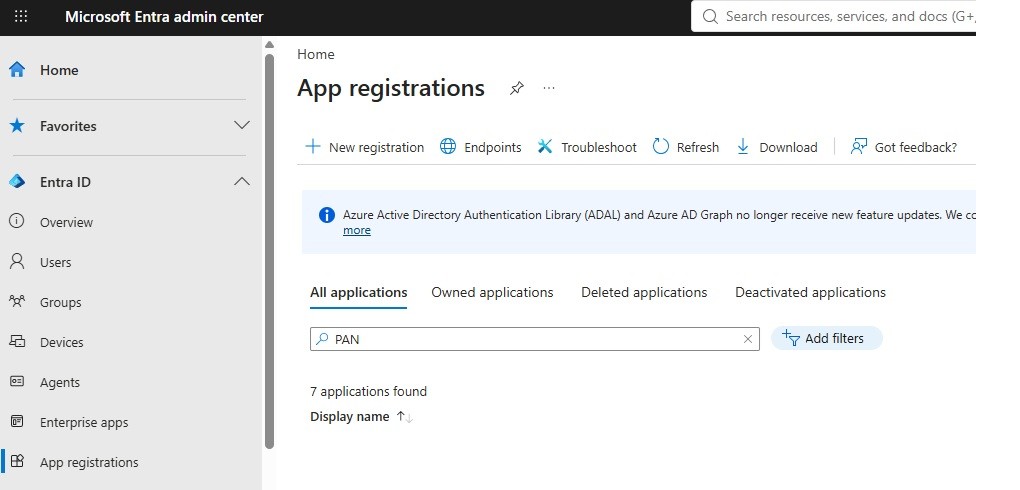
A plain app registration — no redirect URI.
Then create a client secret and record its Value immediately. The Value is shown only once; the Secret ID is not what you n
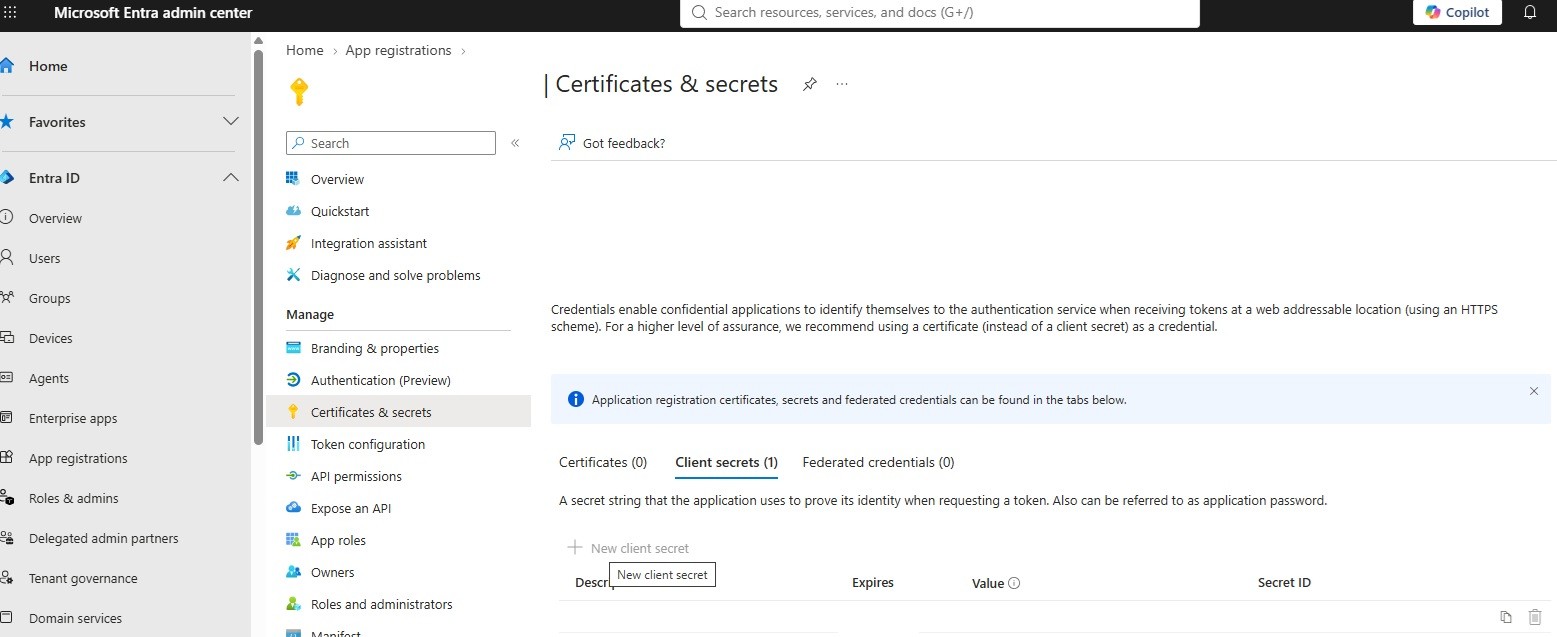
ecord the secret's Value, not its Secret ID.
4. Assign the ingestion role
The service principal needs permission to push to Azure Monitor. On the DCR, open Access control (IAM) and assign Monitoring Metrics Publisher to the app registration. Scope it to the DCR itself rather than the resource group if you want least privilege.
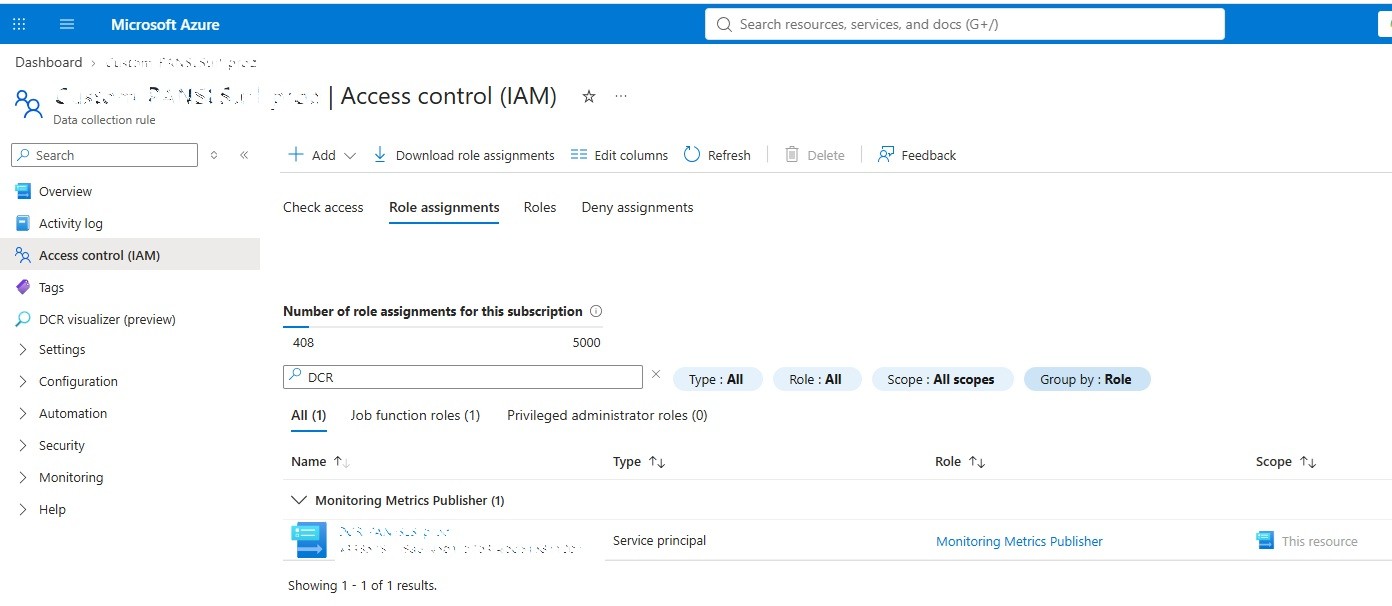
Monitoring Metrics Publisher, scoped to the DCR, granted to the service principal.
5. Build the forwarding profile in Strata Cloud Manager
In SCM, go to System Settings → Strata Logging Service → Log Forwarding → HTTPS and add a new HTTPS profile:
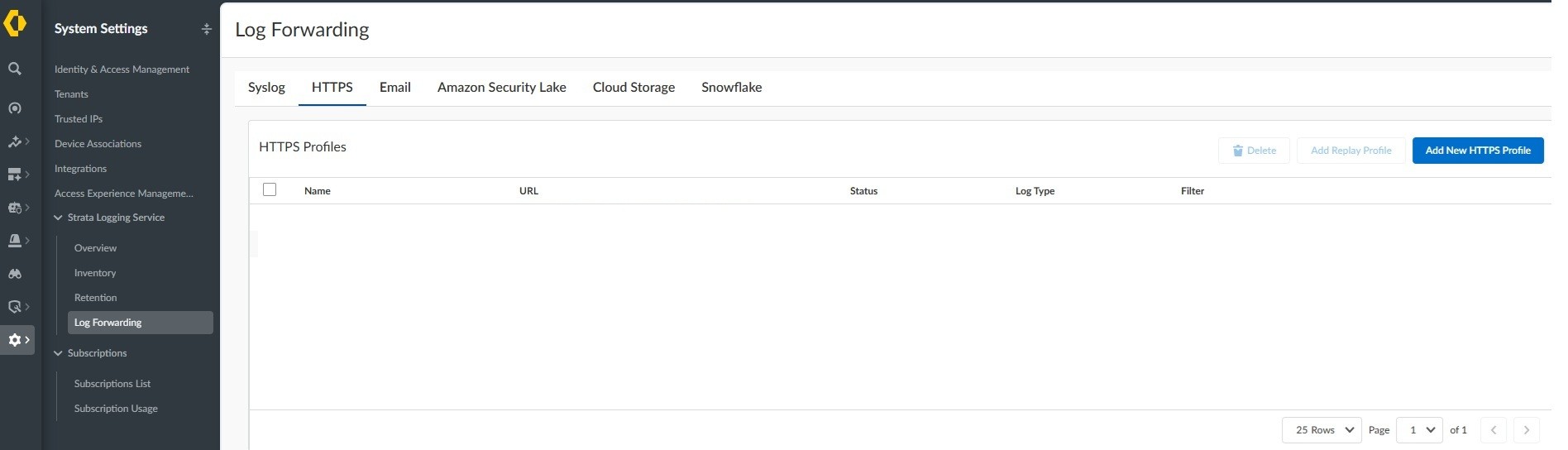
Give the profile a name. If you split each log type into its own Sentinel table, use the profile name to correspond with log type.
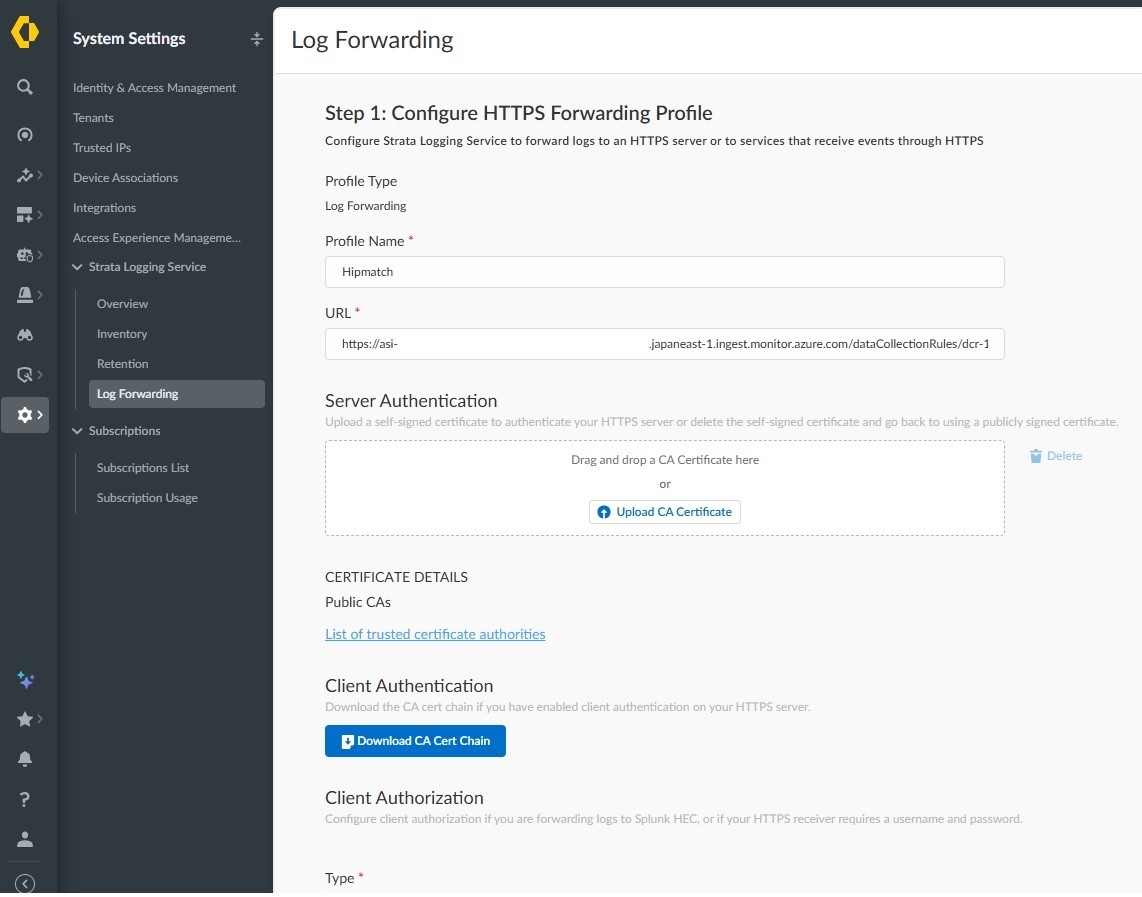
Step 1 of the profile — name and destination URL.
The URL and the client-authorisation fields are the crux. Map them as follows:
SLS field | Value | |
|---|---|---|
URL (Destination) |
| |
MS Tenant ID | Entra ID → Overview → Tenant ID | |
Client Request ID | App registration's Application (client) ID | |
Client Secret | The secret's Value (not the Secret ID) | |
Token Endpoint |
| |
Scope |
|
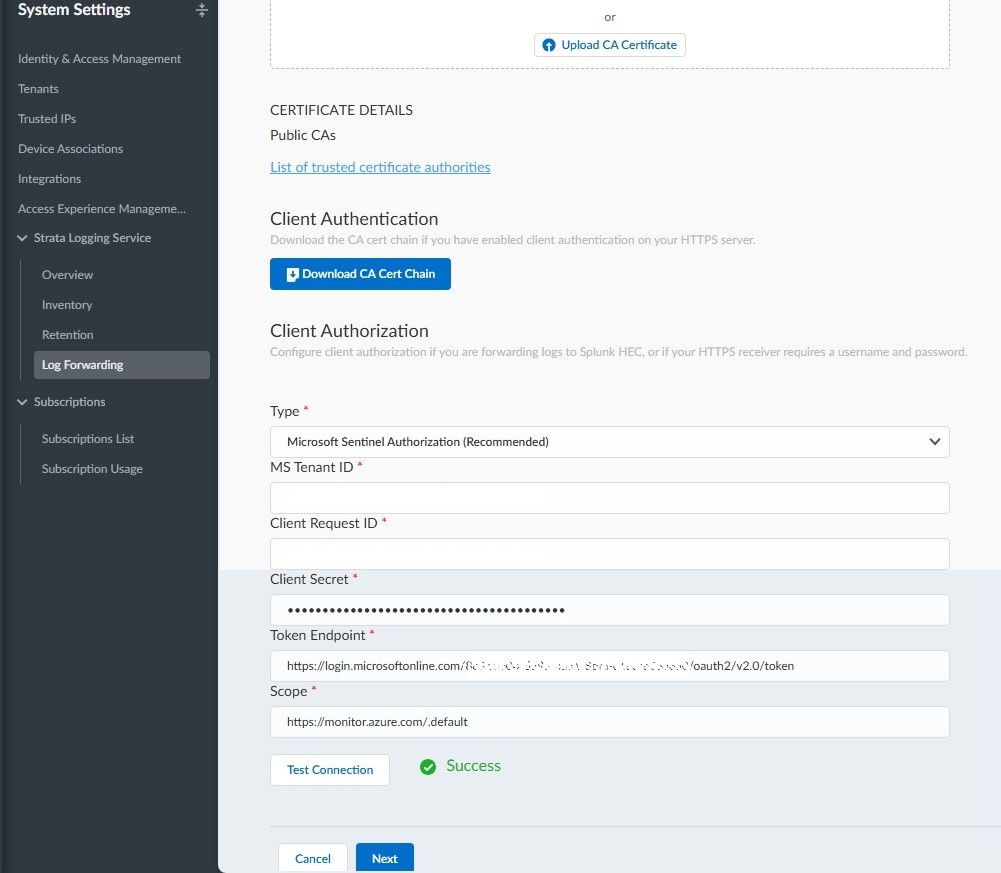
Two things the field labels invite you to get wrong: SCM's Client Request ID is the Entra Application (client) ID, and Client Secret is the secret Value, not the Secret ID. Cross either and the test fails with an opaque error. And only api-version 2023-01-01 was accepted in testing, even though Azure exposes other versions.
Press Test Connection. A green Success means auth and the endpoint resolve, and the Next button unlocks.
6. Choose what to forward
Step 2 defines the payload. Leave the format as ARRAY_JSON and add a filter per log type — Network Logs, hipmatch, threat, and so on — so only the logs you intend reach this tabl
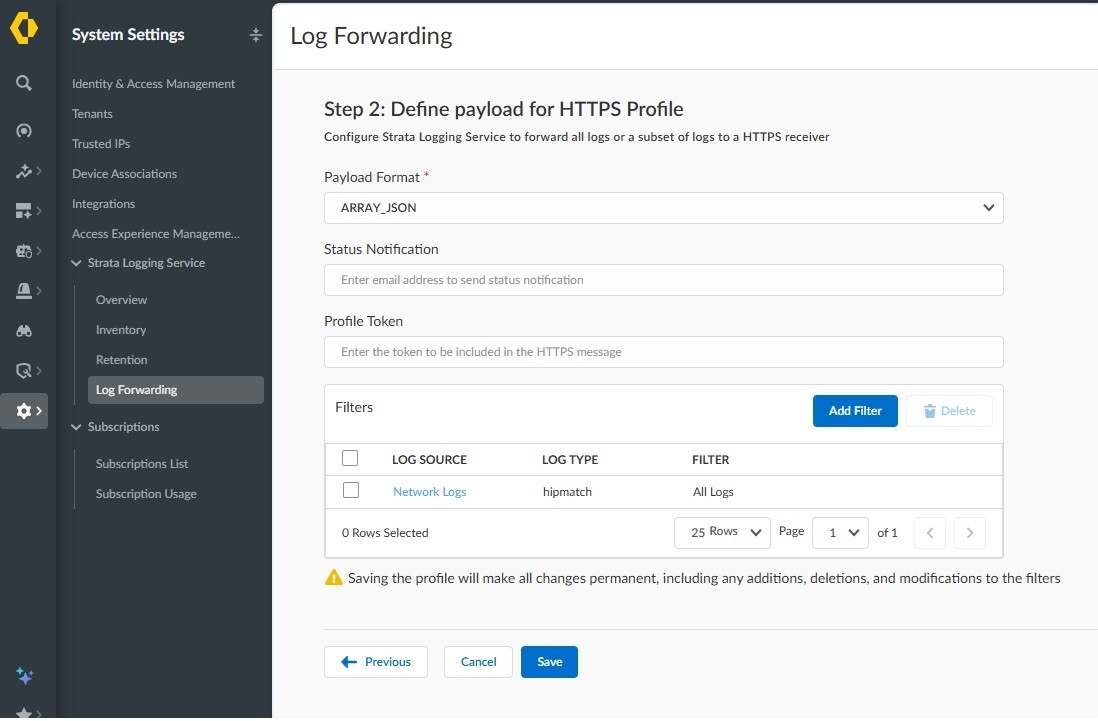
A filter scoping the profile to a single log type.
Saving is permanent. The warning about changes being made permanent is not boilerplate — it commits the filter set.
7. Provision, then confirm ingestion
After saving, the profile moves through Pending and Provisioning before Running.
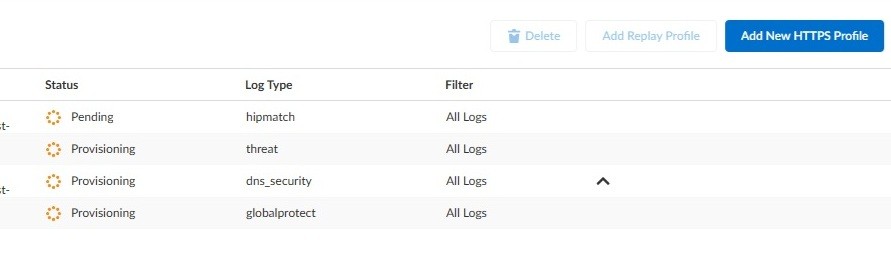
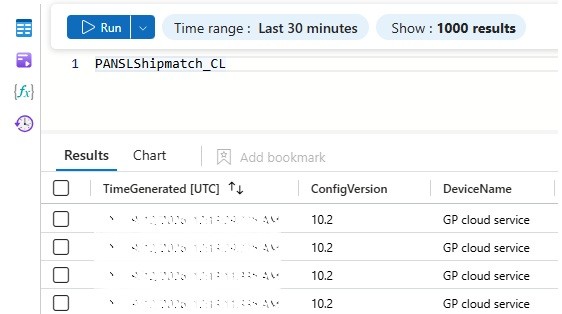
Within a few minutes the Sentinel table populates. Query it by name and confirm rows are arriving.
A 204 is a receipt, not a guarantee
This is the failure mode to internalise, because it's the one the vendor documentation mentions once and moves past. The DCE returns HTTP 204 when it accepts your payload. That confirms the endpoint received the data — nothing more. If a field's name or type doesn't match the table, or the field was never declared, Azure drops it on ingestion. The transport looks perfectly healthy while the column stays empty.
So when a Sentinel column comes up blank, don't chase the network path. The cause is almost always the schema.
Palo Alto field type | Examples | Azure data type |
|---|---|---|
Time / date |
|
|
Identifiers / IPs |
|
|
Counts / bytes |
|
|
Ports |
|
|
Column names are case-sensitive. Booleans must be JSON true/false. Hexadecimal strings such as Flags and ActionFlags must be declared as strings. Fix the schema or the transformation — not the pipe.
Deleting a profile — one quiet caveat
Worth knowing before you clean up. Deleting a forwarding profile in SCM gives no confirmation dialog and no immediate feedback: the page sits for about five seconds, then a success toast appears top-right. All remaining profiles briefly flip to Provisioning, but forwarding to Sentinel is not interrupted. It looks alarming the first time; it's normal.
In short
The legacy Data Collector API is end-of-support on 14 September 2026; the DCR-based Log Ingestion API is the supported path. Migrate — but you're not racing a hard shutdown.
Build the Azure side first: DCE, then a DCR with an exact table schema, then a service principal with Monitoring Metrics Publisher on the DCR.
Sentinel forwarding lives only in Strata Cloud Manager now.
The schema is enforced. A 204 means received, not stored — empty columns are a schema problem, not a transport one.
Migrating a legacy table? Strip the
_s/_d/_bsuffixes; the DCR uses bare column names.
FAQ
Do I have to migrate off the Data Collector API? You should. Support ends 14 September 2026. Existing ingestion continues for TLS 1.2+ clients afterwards, but the API gets only critical security fixes and no new capability, and it never supported Azure Monitor Private Link. Treat anything still on it as legacy.
My Sentinel table is empty but the connection test passed — what's wrong? Almost always a schema mismatch. A 204 from the endpoint confirms receipt, not ingestion. Check column names (case-sensitive), types (hex as string, booleans as JSON true/false), and that every field you send is declared in the DCR or handled in the transformation. Undeclared fields are dropped silently.
Where is the Sentinel forwarding setting — I can't find it in Strata Logging Service? It moved to Strata Cloud Manager: System Settings → Strata Logging Service → Log Forwarding → HTTPS. As of mid-2026 it may need enabling per tenant via a support case.
Can I keep my existing custom table? Yes — migrate it to the Log Ingestion API and reuse the schema, but remove the legacy type suffixes from the column names first (Action_s → Action). Alternatively, create a fresh table and delete the legacy one once you've verified data is landing.
Which api-version should the URL use? 2023-01-01. Other versions exist, but this was the only one accepted in testing.
Pavel Kucera is an independent network security architect (CCIE No. 61291) working on firewall policy, segmentation, and OT/IoT visibility across enterprise and industrial environments. If you are planning a log-forwarding migration or reviewing Microsoft Sentinel ingestion architecture, let’s talk.
Sources
All vendor references verified 14 September 2026.
Forward Logs to Microsoft Sentinel — Palo Alto Networks
Network Logs — Palo Alto Networks
Migrate from the HTTP Data Collector API to the Logs Ingestion API — Microsoft Learn
Azure Monitor HTTP Data Collector API (legacy reference) — Microsoft Learn