P
K

Why Automated Commit Recovery Might Not Save Your Firewall Change
Panorama's Automated Commit Recovery is a safety net, not a control. Here is a real incident where every connectivity check passed, every firewall stayed broken, and recovery required an out-of-band console.
·
10 min read
·
Panorama
PAN-OS
Palo Alto Networks
Incident Analysis
Firewall Operations
Applies to
PAN-OS 9.1 → 12.2 · Panorama-managed firewalls
Observed on
PAN-OS 11.1.13
Issues referenced
PAN-236672 · PAN-295803 · PAN-314126
Key takeaways
Automated Commit Recovery (ACR) reverts a firewall’s configuration only when its connectivity test to Panorama fails. It has no safeguard against a test that falsely succeeds.
In the incident below, a misconfigured Device Group pre-rule blocked all traffic, yet the firewall’s post-commit connectivity check reported success against both Panorama nodes — so nothing was reverted.
The hourly check that documentation describes as a second line of defence logged
panorama-check-skipinstead of running, because the firewall no longer had an active Panorama session.Recovery required manual intervention over an out-of-band console server.
The durable fix is architectural, not feature-based: a rule in the Shared pre-rulebase, in first position, that always permits firewall-to-Panorama traffic. It is the only placement nothing else in the evaluation order can shadow.
What Automated Commit Recovery actually does
Automated Commit Recovery was introduced in PAN-OS 9.1 (December 2019) under the name Automatic Panorama Connection Recovery. Its purpose is narrow and useful: make sure a configuration pushed from Panorama does not sever the connection between the firewall and Panorama itself.
The mechanism is straightforward. After a Panorama push or a local commit is applied, the firewall initiates a connectivity test to Panorama over TCP 3978. If the test fails, the firewall reverts to its previous running configuration. Each firewall in an HA pair runs its test independently, and only the firewall configuration is rolled back — leaving Shared Policy or Template Status showing as out of sync under Panorama → Managed Devices → Summary. That mismatch is the intended signal: it tells you a device rejected what you pushed.
The feature is enabled by default and lives under Device → Setup → Management → Panorama Settings.
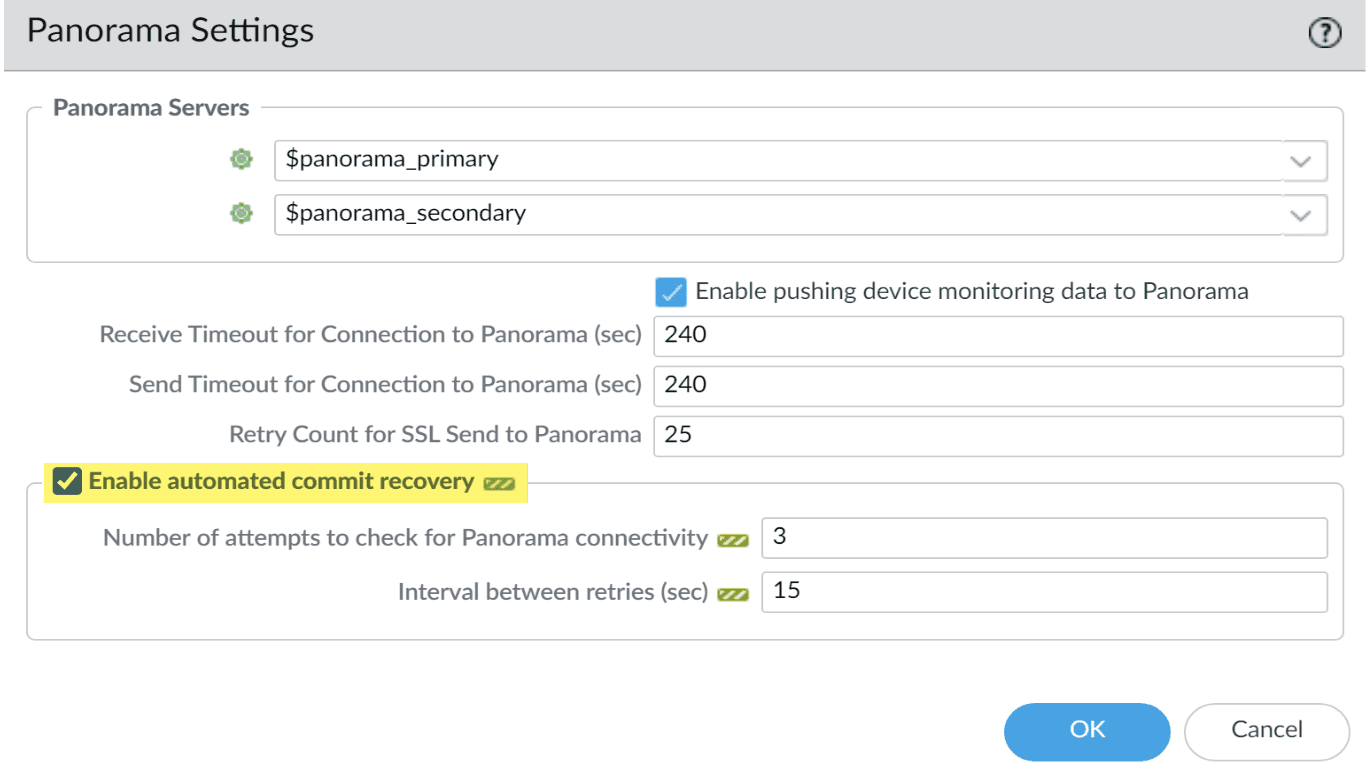
Figure 1 — Automated Commit Recovery is enabled by default. Only the attempt count and retry interval are worth tuning.
There is no good reason to disable it, and little reason to modify it beyond tuning those two timers. The changes that typically break the management path are well known:
Management interface or service route changes.
Security policy or Interface Management Profile changes.
Changes to static routes or routing protocols.
Introducing decryption, QoS, or any other feature that inspects or reshapes traffic in the path between Panorama and the firewall.
A feature that has barely changed in six years
Since its release, ACR has not been revamped and has not been the subject of a major software regression. The table below traces its development.
Release | Development |
|---|---|
PAN-OS 9.1.0 | Introduced as Automatic Panorama Connection Recovery. Managed firewalls test connectivity after Panorama pushes and local commits, run an hourly check, and restore the previous running configuration on failure. Enabled by default. Initial defaults: one attempt, 10-second retry interval. HA peers test independently. |
PAN-OS 10.0 | Renamed to Automated Commit Recovery. |
ZTP firewalls | Enabling automated commit recovery can cause the first configuration push after adding ZTP firewalls to Panorama to be reverted automatically. The documented workaround is to set the attempt count to five. (Tracked internally as PAN-205085.) |
PAN-OS 10.2.15 | PAN-236672 — “The automated commit recovery feature default iteration and timeout values have changed. The default iteration value has changed from 1 to 5 seconds, and the timeout value has changed from 10 to 30 seconds.” |
PAN-OS 11.1 / 11.2 maintenance | PAN-295803 — Addressed a memory leak issue under sc3 and automatic commit recovery (ACR) code path. Fixed in PAN-OS 11.2.10-h3 and corresponding 11.1 maintenance builds. |
Two things are worth noting about PAN-236672. First, the release-note wording is imprecise: the iteration value is a count of attempts, not a duration in seconds — read it as one attempt to five attempts, and a 10-second interval to 30 seconds. Second, the defaults you actually see in a given deployment depend on both the PAN-OS version and whatever the previous administrator set. Verify them per device rather than assuming.
The incident: everything passed, nothing worked
During a post-mortem for a client, I came across a case that changed how I think about this feature. A misconfigured Device Group pre-rule was pushed to every managed firewall, causing a widespread outage. All firewalls lost connectivity to Panorama. Reviewing the system logs on one of them produced the following sequence.

Figure 2 — Configuration installed at 21:34:15. Both Panorama connectivity checks reported success within five seconds. BGP sessions began dropping roughly sixty seconds later.
Read the order carefully. The configuration that blocked all traffic was installed at 21:34:15. Four seconds later the firewall performed its connectivity check against the primary Panorama node and reported success. One second after that, the same result for the secondary node. Only at 21:35:22 — over a minute later — did BGP sessions start leaving the established state. The firewall had every opportunity to detect the break and revert. It did not, because as far as it could tell, nothing was broken.
Why the check passed
A misconfigured policy that blocks all traffic should have caused the connectivity test to fail. It did not, and there are two plausible explanations.
The first is PAN-314126, addressed in PAN-OS 11.1.15: “Fixed an issue where session rematch did not properly apply updated Security policy rules to existing traffic flows after committing changes, which caused traffic to still be allowed when a new Security policy was set to Deny.” The firewall in this environment was running 11.1.13 — within the affected range.
The second is a race condition between policy installation and the connectivity test itself. The check runs within seconds of the commit, and an already-established session to Panorama that has not yet been re-evaluated will still pass. Either way the outcome is identical, and it is the important part: ACR validated the connection using a session that the new policy had not yet been applied to. The test was not wrong about what it measured. It measured the wrong thing.
The hourly check that never ran
Palo Alto Networks documentation describes a second line of defence, in Panorama Commit, Validation, and Preview Operations:
The managed firewalls test their connection to Panorama every 60 minutes and if a managed firewall detects that it can no longer successfully connect to Panorama then it reverts its configuration to the previous running configuration.
That is not what the logs show.

Figure 3 — At each hourly interval the firewall logged panorama-check-skip: 'Skipping connection check … since the panorama is not actively connected.'
The panorama-check-skip timestamps line up precisely with the 60-minute interval, but the behaviour is the opposite of what the documentation implies. Rather than testing the connection, failing, and reverting, the firewall skipped the check entirely — on the grounds that Panorama was not actively connected.
The logic is defensible in isolation. Reverting a configuration every hour because a Panorama appliance happens to be offline for maintenance would be worse than the disease. But it produces a circular failure mode: the check that exists to recover a lost Panorama connection refuses to run because the Panorama connection is lost.
You can reproduce this filter yourself in Monitor → System: ( subtype eq panorama-check )
What the event types tell you
As of this writing, panorama-check carries four event IDs at informational severity and one at critical severity. Palo Alto’s reference splits them across two tables; consolidated by severity they read as follows.
Event ID | Severity | Message |
|---|---|---|
| Informational |
|
| Critical |
|
| Informational |
|
| Informational |
|
| Informational |
|
Consolidated from the PAN-OS System Log Event reference, which splits these across separate informational and critical tables.
The practical reading:
panorama-check-test at informational severity means the check ran and passed. It does not mean the firewall is healthy.
panorama-check-test at critical severity is the only event that leads to a revert.
panorama-check-skip means no test was performed. If you alert on failures only, you will never see it.
panorama-check-auto-revert confirms a rollback actually completed.
If you take one operational change away from this article, make it this: alert on panorama-check-skip, not only on failures. A skipped check is a firewall telling you it has already lost Panorama and has decided not to do anything about it.
The gap
ACR includes a safeguard against reverting too eagerly — multiple attempts, spaced by a retry interval, so that a brief outage or a routing convergence event does not trigger an unnecessary rollback. That safeguard is sound, and the move from one attempt to five was the right call.
There is no equivalent safeguard in the other direction. Nothing in the feature protects against a false success: a check that passes against a stale session, on a firewall that is already isolated. And a false success is the more dangerous failure, because it is silent. A failed check produces a critical log and a revert. A falsely successful check produces an informational log and a broken network.
In this incident there was no path back other than manual intervention through an out-of-band console server.
What to do instead
Relying on Automated Commit Recovery to undo a change that broke the management path is not a strategy. Treat it as what it is — a useful backstop that handles the common cases — and build the actual protection into the policy.
1. Put a management-path rule first in the Shared pre-rulebase.
Placement matters more than the rule itself. A Panorama-managed firewall evaluates Security policy in this order:
Shared pre → Device Group (parent) pre → Device Group (child) pre → local → Device Group (child) post → Device Group (parent) post → Shared post → default
Two consequences follow, and both are easy to get wrong. A local rule cannot protect you, because every pre-rule is evaluated before it. And a rule in a child Device Group’s pre-rulebase does not protect you from a mistake in a parent Device Group’s pre-rulebase — which is close to what happened here.
Only the first rule in the Shared pre-rulebase sits above everything else. Place it there: permit traffic between the firewalls and Panorama (TCP 3978), plus the path you use for management access (TCP 22 / 443). One rule, highest precedence, and a policy mistake anywhere below it still leaves you a way in.
2. Verify the ACR timers per device rather than per fleet.
Defaults have changed across releases and are frequently overridden. Confirm the attempt count and retry interval on the devices you actually operate.
3. Alert on skipped checks.
Forward panorama-check-skip to your monitoring platform. It is the earliest reliable indicator that a firewall is stranded.
4. Confirm out-of-band access before you need it.
Console server reachability, credentials, and the path to them should be tested on a schedule — not discovered during an outage.
5. Stage pushes where the blast radius justifies it.
Push to a single device or a small Device Group first, verify Panorama connectivity and BGP adjacency, then proceed. ACR does not make a full-fleet push safe.
6. Know your PAN-OS exposure.
If you are running a version below PAN-OS 11.1.15 in the 11.1 train, PAN-314126 is unfixed in your environment and session rematch may not apply new deny rules to existing flows.
In short
Automated Commit Recovery is a well-designed feature solving a real problem, and it has been stable for six years. But it validates connectivity in a window where the very policy it is validating may not yet have been applied — and when it later finds Panorama unreachable, it declines to act. Whether you are managing a small deployment or critical infrastructure, the best practice remains unchanged: put a rule first in the Shared pre-rulebase that always allows the firewall-to-Panorama path, and give yourself the chance to fix your own mistake.
Frequently asked
Does Automated Commit Recovery run on both HA peers?
What does panorama-check-skip mean?
Which PAN-OS versions changed the ACR defaults?
Can Automated Commit Recovery fail to protect you?
Pavel Kucera is an independent network security architect (CCIE No. 61291) working on firewall policy, segmentation, and OT/IoT visibility across enterprise and industrial environments. If you are reviewing a Panorama estate, planning a migration, or want a second opinion on a design before it becomes an operational decision — let’s talk.
Sources
All vendor references verified 26 July 2026.
Features Introduced in PAN-OS 9.1 — Panorama Features — Palo Alto Networks
Enable Automated Commit Recovery — Panorama Administrator’s Guide — Palo Alto Networks
Panorama Commit, Validation, and Preview Operations — Palo Alto Networks (source of the 60-minute quote)
Troubleshoot Automatically Reverted Firewall Configurations — Palo Alto Networks
PAN-OS 10.2.15 Addressed Issues (PAN-236672) — Palo Alto Networks
PAN-OS 11.1.15 Addressed Issues (PAN-314126) — Palo Alto Networks
PAN-OS 11.2.10-h3 Addressed Issues (PAN-295803) — Palo Alto Networks
Ports Used for Panorama — Palo Alto Networks
Manage the Rule Hierarchy — Palo Alto Networks
Device Group Policies — Palo Alto Networks